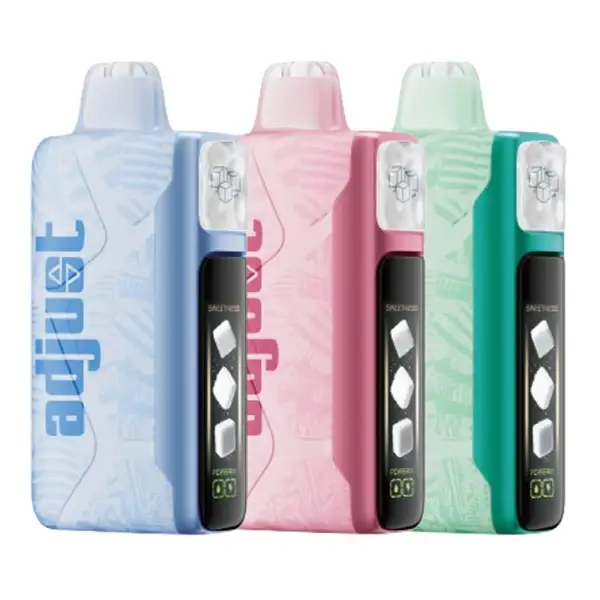
Step-by-step instructions for charging both Foger devices: the Switch Pro 30K battery dock and the Bit 35K disposable. Includes charge times, USB-C cable requirements, LED/OLED indicator meanings, pass-through charging info, and fixes for common charging problems. Also covers: Fogger vape charger, Foger charger type, and Foger not charging.
Quick Answer — What Charger Does Foger Vape Use?
Both the Foger Switch Pro 30K and Foger Bit 35K charge via USB-C. Any standard USB-C cable and 5V/1A adapter (the same kind that comes with most phones) will work. The Switch Pro 30K kit includes a USB-C cable in the box; the Bit 35K does not include one but uses the same standard cable.
| Detail | Switch Pro 30K | Bit 35K |
|---|---|---|
| Charging Port | USB-C (on battery dock) | USB-C (on device bottom) |
| Charge Time | 45-60 minutes | 30-45 minutes |
| Cable Included? | Yes (in kit) | No |
| Recommended Adapter | 5V / 1A | 5V / 1A |
| Indicator | OLED screen (battery %) | LED light |
| Pass-Through Charging | Yes | Varies by batch |
Avoid using high-wattage fast-charging adapters (25W, 45W, 65W bricks designed for laptops or fast-charge phones). These output higher voltage and amperage than Foger's battery is designed for. While most devices have basic overcurrent protection, using a fast charger regularly can stress the battery and shorten its lifespan. Stick to a standard 5V/1A or 5V/2A adapter.
How to Charge the Foger Switch Pro 30K
On the Switch Pro, the battery lives in the dock (the power bank), not in the pod. You charge the dock — the pod doesn't need charging and has no battery of its own. Here's the process:
How to Charge the Foger Bit 35K
The Bit 35K is a standard disposable with an integrated rechargeable battery. The process is simpler since there's no dock — you charge the device directly.
LED & OLED Indicator Meanings
Switch Pro 30K (OLED Screen)
The Switch Pro's OLED screen provides exact data — no guessing required:
| Display | Meaning |
|---|---|
| Battery % (e.g. 75%) | Current charge level — charges to 100% |
| Charging animation + rising % | Device is actively charging |
| 100% (static) | Fully charged — safe to unplug |
| Screen flashes then dims | Battery critically low — charge immediately |
| Puff counter + juice bar | Normal use display (not charging) |
| Screen doesn't turn on | Battery completely dead — plug in and wait 2-3 minutes for it to boot |
Bit 35K (LED Indicator)
The Bit 35K uses a simple LED light near the mouthpiece. LED behaviors vary slightly between production batches, but the general pattern is:
| LED Behavior | Meaning |
|---|---|
| Red / solid light while plugged in | Charging in progress |
| Green / light turns off | Fully charged |
| Rapid blinking (10+ blinks) during use | Battery low — needs charging |
| Slow blinking during use | Medium battery — charging soon recommended |
| No light at all when drawing | Fully dead OR e-liquid empty — try charging first |
| White flash then nothing | Short-circuit protection triggered — see troubleshooting |
Can You Vape While Charging? (Pass-Through Charging)
Switch Pro 30K: Yes. The battery dock fully supports pass-through charging. You can vape with the USB-C cable plugged in — the device draws power from both the battery and the cable simultaneously. This is useful when you're at 5% and don't want to stop. The charging will be slightly slower while actively vaping, but both functions work without issues.
Bit 35K: It depends. Some Bit 35K units support pass-through, others don't — it varies by production batch. If your Bit 35K lets you draw while plugged in, it's supported on your unit. If it doesn't fire while charging, that's normal for that batch. It doesn't indicate a defect; the feature just isn't universally enabled.
Foger Not Charging — Troubleshooting Guide
If your Foger vape isn't charging, work through these common fixes before assuming the device is defective:
If none of these fixes resolve the issue, the device may have a manufacturing defect. Contact our support team at service@vapesonlineshop.com or WhatsApp +1 (840) 242-7388 for assistance with warranty claims on products purchased from VapesOnlineShop.
Battery Care Tips — Make Your Foger Last Longer
For the Switch Pro Battery Dock
The Switch Pro dock uses a lithium-ion battery with a lifespan of 300+ charge cycles. Here's how to maximize it:
Don't use fast-charging bricks (25W+). Don't leave plugged in overnight regularly. Don't store in a hot car or in direct sunlight. Don't charge on a pillow or blanket (traps heat). Don't submerge in water — the dock is not waterproof.
For the Bit 35K
Since the Bit 35K is a disposable, battery longevity is less of a concern — you'll use the device until the e-liquid runs out, then replace the whole unit. The main goal is just to avoid situations where the battery dies before the juice does: charge when the LED starts blinking, and use a proper 5V adapter.
Frequently Asked Questions
What type of charger does Foger vape use?
USB-C. Both the Switch Pro 30K and Bit 35K use standard USB-C charging ports. Any USB-C cable with a 5V/1A adapter works. The Switch Pro kit includes a cable; the Bit 35K does not. A phone charger cable is typically compatible.
How long does it take to charge a Foger vape?
The Switch Pro 30K battery dock takes 45-60 minutes from empty to full. The Bit 35K takes 30-45 minutes. Partial charges are proportionally faster — topping off from 50% to 100% takes roughly 25-30 minutes on the Switch Pro.
Can I use a fast charger for my Foger vape?
You shouldn't. Fast-charging adapters (25W, 45W, 65W) output higher voltage and current than the Foger's battery is designed to handle. While basic overcurrent protection exists, regular use of fast chargers can stress the battery and reduce its lifespan. Stick to a standard 5V/1A or 5V/2A adapter — any basic phone charger works.
My Foger vape is blinking but not hitting — is it a battery issue?
Probably, but check two things. First, is the battery low? Rapid LED blinking usually means the battery needs charging — plug it in for 30-60 minutes. Second, is the e-liquid empty? On the Bit 35K, check the tank window. On the Switch Pro, check the OLED juice level. If the pod is empty but the battery is charged, you need a new pod, not a charge. For more troubleshooting, see our Foger setup and troubleshooting guide.
Can I charge my Foger Switch Pro while the pod is attached?
Yes. You don't need to remove the pod to charge the battery dock. The USB-C port on the bottom is accessible whether a pod is attached or not. You can even vape while it's charging (pass-through charging is supported).
Why won't my Foger vape turn on after charging?
If the Switch Pro's OLED screen doesn't respond after charging: try a different cable and adapter, wait 5-10 minutes for a deeply discharged battery to boot, and ensure the pod is fully seated (the screen may not activate without a pod attached). If the Bit 35K shows no LED after charging, the e-liquid may be empty — check the tank window. If juice remains and neither LED nor vapor occurs, contact support.