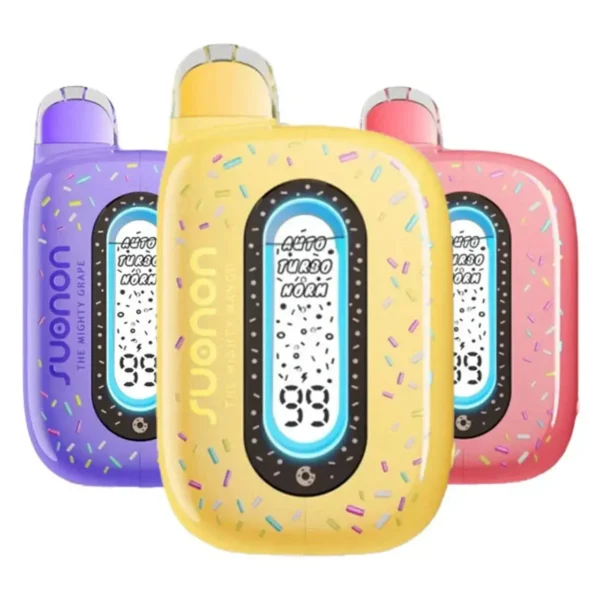
The Suonon Donete 50K is more complex than a typical disposable vape. It arrives in two pieces, has three power modes, adjustable airflow, and a transparent display that shows more information than most users are used to seeing. If you've just unboxed your first Donete and the instructions card wasn't enough, this guide walks you through everything — from first assembly to daily use, mode switching, charging, and troubleshooting.
First-Time Setup (Assembly)
Unlike most disposable vapes, the Donete 50K ships in two separate pieces. This is a deliberate safety feature — the two-piece design prevents the device from accidentally activating during shipping. Here's how to set it up:
Remove the device from the packaging. It comes in a plastic bag inside the box. Take it out and set aside the instructions card.
There's a protective seal on the device. Peel it off completely.
Pull out the small silicone plug from the mouthpiece opening. This keeps the device sealed during transport.
Align the two separated sections and push them together firmly until you hear a "click" sound. This locks the device and activates the internal connection. Once clicked, the device is ready to use.
How to Hit the Donete 50K
The Donete 50K is draw-activated — there's no fire button. Simply put the mouthpiece to your lips and inhale. The device detects airflow and fires automatically. The LED display will light up to confirm activation, showing your current mode and battery level.
For the best experience, take steady, moderate draws rather than short sharp puffs. The dual mesh coils need a moment to fully heat the e-liquid, so a 2-3 second draw produces better flavor than rapid quick hits. The device deactivates automatically when you stop inhaling.
Switching Between Modes
The mode switch button is located on the bottom-right side of the device, just above the USB-C charging port. Press the button to cycle through modes:
The LED screen shows the current mode name when you switch. If you're new to the Donete, start with Auto mode — it provides the best balance between flavor, battery life, and juice consumption. Switch to Norm when you want the device to last as long as possible, and use Turbo sparingly for moments when you want maximum flavor impact.
Adjusting Airflow
The airflow control is a dial on the bottom of the device. Rotate it to adjust how much air mixes with the vapor:
There's no "right" setting — it's personal preference. If you're coming from cigarettes, a more restricted airflow will feel familiar. If you prefer bigger clouds and a cooler draw, open it up. The airflow adjustment works independently from the power mode, so you can combine tight airflow with Turbo mode for a very intense experience, or open airflow with Norm for the smoothest possible draw.
Reading the LED Display
The Donete 50K's transparent 3D curved LED screen shows several pieces of information. Here's what each element means:
| Display Element | What It Shows | What to Do |
|---|---|---|
| Battery icon / percentage | Remaining battery charge | Charge via USB-C when low |
| Mode indicator | Current power mode (NORM / AUTO / TURBO) | Press bottom button to switch |
| Screen color | Changes color per mode (RGB backlight) | Visual confirmation of mode change |
| Visible juice behind screen | Remaining e-liquid level | Stop using when juice is visually depleted |
| Donut animation | Decorative animation on activation | Normal — confirms device is firing |
The biggest advantage of the transparent display is the juice visibility. Unlike opaque disposables where you guess when the tank is empty, you can see the actual liquid level at all times — even when the screen is off. When the juice drops below the visible coil window, it's time to stop using the device to avoid dry hits.
Charging Guide
The Donete 50K uses a USB-C charging port located on the bottom of the device. A charging cable is not included — use any standard USB-C cable you already own.
Tips for Best Performance
Troubleshooting Common Issues
| Problem | Likely Cause | Solution |
|---|---|---|
| Device doesn't fire | Two halves not fully clicked together | Push the halves firmly until you hear a clear click |
| No vapor, screen lights up | Airflow fully closed or mouthpiece plug still in | Check that mouthpiece plug is removed; open airflow dial |
| Weak/no flavor | Running on Norm mode with tight airflow | Switch to Auto or Turbo; open airflow slightly |
| Burnt taste | Juice level below coil; chain-vaping too fast | Check transparent tank — if empty, the device is spent. If juice remains, wait 15-30 seconds between hits |
| Screen not displaying | Battery dead | Charge via USB-C for 60-90 minutes |
| Mode won't switch | Button press not registering | Press the bottom-right button firmly (short press, not hold). Ensure it's not pressed while firing. |
| Leaking | Stored on its side; airflow too open | Store upright. Slightly restrict airflow. Wipe the mouthpiece clean. |
| Device auto-fires | E-liquid in airflow sensor | Gently blow into the mouthpiece (without firing) to clear condensation. If persistent, contact customer support. |