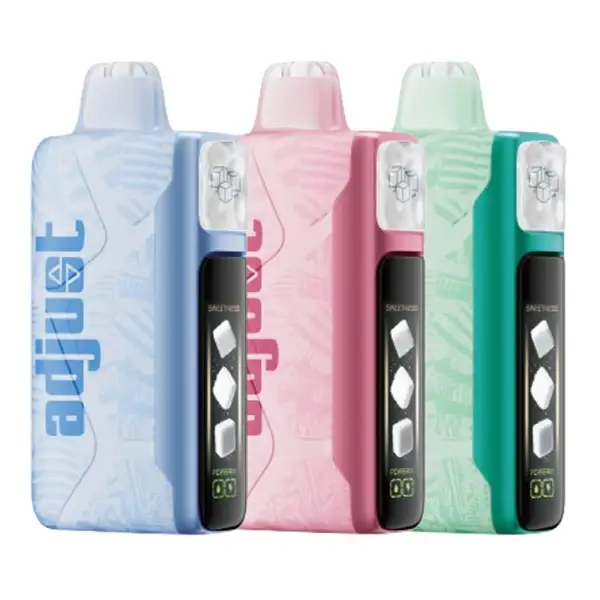
The Off Stamp X-Cube has more features than any standard disposable vape — three power modes, two airflow settings, a TFT screen, magnetic pod swapping, and Sweet Cube's adjustable sweetness. That is a lot of controls for a device that is still technically draw-activated. This guide walks through everything from first-time setup to advanced settings, pod replacement, charging, troubleshooting, and maintenance. Whether you just unboxed your first kit or you have been using the X-Cube for weeks and want to get more out of it, this page covers it all.
Also searched as: how to use off stamp vape, off stamp instructions, off stamp vape instructions, how to charge off stamp, off stamp x cube how to use, off stamp vape charging, off stamp sweetness button
First-Time Setup — Unboxing to First Puff
The X-Cube kit includes: one rechargeable dock, one pre-filled pod (your chosen flavor), a USB-C cable, and a quick-start card. No wall adapter is included — use any USB-C adapter you already own (phone chargers work fine).
That is all it takes. The device is ready to use the moment the pod clicks in and the screen lights up. No pairing, no Bluetooth, no app downloads.
How to Vape — Draw Technique
The X-Cube supports two inhale styles depending on your airflow setting:
Draw vapor into your mouth first, then inhale into lungs. Similar to how you smoke a cigarette. Set the airflow slider to the tighter position. Best paired with Light or Normal mode. Produces less visible vapor and a more pronounced throat hit.
Inhale vapor straight into your lungs in a slow, deep breath. Set the airflow slider to the looser position. Best paired with Normal or Turbo mode. Produces more visible vapor with a smoother throat hit.
Tip for beginners: Start with MTL airflow + Normal power. This is the most cigarette-like experience and the easiest transition for new vapers. Once comfortable, experiment with DTL airflow or Turbo mode for more vapor production.
Puff duration: Each draw should last 2–4 seconds. The X-Cube has a safety cutoff at approximately 8 seconds — if you draw longer than that, it stops firing automatically. This is a standard safety feature across all modern vapes.
Power Modes — Light, Normal, Turbo
Press the front button on the dock to cycle through modes. The current mode displays on the TFT screen. The dock remembers your last setting between sessions — if you turn it off in Turbo and come back later, it starts in Turbo.
| Mode | How to Activate | What Changes | Best For |
|---|---|---|---|
| Light | Press button until Light icon shows | Lower wattage. Less vapor, cooler draw, softer throat hit. ~40% less vapor than Normal. | Stealth vaping, conserving battery, light flavor sampling, nighttime use |
| Normal | Default on first use; press to cycle back | Balanced wattage. Full flavor, medium vapor, moderate throat hit. | All-day use, most users most of the time |
| Turbo | Press button past Normal | Maximum wattage. Dense vapor, warm draw, intense flavor, strong throat hit. | Flavor chasing, cloud production, bold menthol hits |
Turbo mode drains the dock battery roughly 60% faster than Normal and consumes e-liquid faster. A 25K pod may deliver closer to 18,000–20,000 puffs if used predominantly in Turbo. It also increases throat hit — on menthol or icy flavors, this can feel aggressive for some users.
Airflow Settings — 2-Level Slider
The airflow slider sits on the side of the dock. It has two physical positions — there is no infinite adjustment, just two distinct stops:
| Position | Draw Feel | Recommended Pairing |
|---|---|---|
| Tight (MTL) | Cigarette-like resistance, slower air intake | Light or Normal mode. Menthol and tobacco flavors. |
| Open (DTL) | Airy, faster air intake, deeper inhale | Normal or Turbo mode. Fruit and dessert flavors. |
My recommended combos for different situations:
Sweetness Control — Sweet Cube Only
This feature only works with Sweet Cube pods. Classic, Crystal, and Ice Cube pods are not affected by the sweetness button. If you press the sweetness button with a non-Sweet pod attached, nothing happens.
Sweet Cube pods contain a dual-tank system — two separate e-liquid reservoirs with different sweetness concentrations. The sweetness button on the dock controls how the system blends between them:
| Level | How to Set | Taste Profile | Who It Is For |
|---|---|---|---|
| Level 1 | Press sweetness button once (1 bar on screen) | Subtle sweetness. Sour and tart notes dominate. Dry, clean finish. | Users who find standard candy vapes too sweet. Sour-flavor fans. |
| Level 2 | Press again (2 bars) | Balanced. Equal sweet and sour. Recommended starting point. | Most users. Start here and adjust up or down. |
| Level 3 | Press again (3 bars) | Full dessert mode. Rich, sugary, candy-forward. | Sweet tooth. Dessert lovers. Users who want maximum candy intensity. |
The sweetness level resets to Level 2 each time you reinsert a pod. If you prefer Level 1 or 3, you will need to press the button after every pod swap. The dock does not remember sweetness preferences across pod changes.
The adjustable sweetness is what makes Sweet Cube genuinely unique in the disposable market. No other brand offers this level of flavor customization. For detailed tasting notes on all 8 Sweet Cube flavors at each sweetness level, see our Off Stamp flavors guide.
Reading the TFT Screen
The 2.25-inch color display shows four key pieces of information at all times:
The screen dims automatically after a few seconds of inactivity to conserve battery. It wakes on any draw or button press. In direct sunlight, the TFT can be hard to read — this is a hardware limitation, not a defect.
How to Charge Off Stamp X-Cube
Charging is simple — but there are a few details worth knowing to maximize battery health and convenience.
| Charging Detail | Info |
|---|---|
| Port type | USB-C (bottom of dock) |
| Charging speed | 2A fast charge |
| 0 → 80% | ~19 minutes |
| 0 → 100% | ~38 minutes |
| Pass-through charging | ✅ Yes — vape while plugged in |
| Pod charging | Automatic when pod is docked and dock is plugged in |
| Charging indicator | Screen shows battery percentage and charging animation |
- Use any standard USB-C cable and adapter
- Charge before the dock drops below 10%
- Vape while charging (pass-through is supported)
- Remove pod if storing the dock unused for 2+ weeks
- Leave plugged in overnight after reaching 100%
- Use laptop USB ports (too slow, may not maintain 2A)
- Charge with wet or damaged contacts
- Attempt to charge the pod independently (impossible)
Note about the pod's 100mAh battery: The pod charges automatically whenever it is connected to the dock and the dock is plugged in. You cannot charge the pod separately — it has no USB port of its own. When docked, the pod draws power from the dock's 1,100mAh battery. When the dock is plugged in, both charge simultaneously.
How to Replace Pods
You can swap between Cube series freely — a Classic Cube pod in the morning and a Sweet Cube pod in the evening is perfectly fine. The dock does not care which series is attached. For pod purchasing options, see our Off Stamp pods guide.
Troubleshooting Common Issues
| Problem | Likely Cause | Solution |
|---|---|---|
| No vapor on draw | Pod not seated properly; dock battery dead | Remove and reattach pod until you hear the click. Charge the dock if screen is off. |
| Weak/thin vapor | Light mode active; airflow set to MTL; pod near empty | Switch to Normal or Turbo. Open the airflow slider. Check e-liquid level on screen. |
| Burnt or dry taste | Pod depleted; new pod not primed | Replace the pod. For new pods, wait 2–3 minutes before first puff to let the coil wick. |
| Screen not turning on | Dock battery fully dead; pod not connected | Charge dock via USB-C. Confirm pod is magnetically locked (listen for click). |
| Sweetness button not working | Non-Sweet Cube pod attached | Sweetness control only works with Sweet Cube pods. Classic, Crystal, and Ice are not affected. |
| Pod wobbles or feels loose | Debris on magnetic contacts; possible counterfeit | Clean contacts with a dry cloth. If the problem persists, verify product authenticity. |
| Dock gets warm while charging | Normal during fast charging | Slight warmth is normal with 2A USB-C fast charge. If uncomfortably hot, unplug and contact support. |
| Leaking from pod base | Temperature change or physical damage | Wipe clean, reattach pod. Avoid leaving the device in extreme heat (car dashboard). If leaking continues, replace the pod. |
| Puff counter not resetting | Firmware glitch | Remove pod, wait 10 seconds, reattach. Counter should reset on new pod detection. |
For issues not listed above, contact VapesOnlineShop customer support or reach out to Off Stamp directly through their official website.
Frequently Asked Questions
Can I use the Off Stamp X-Cube while it is charging?
Yes. Pass-through charging is fully supported. Plug in the USB-C cable and vape as normal. The dock charges while you use it — no need to wait for a full charge before vaping.
How do I turn the Off Stamp X-Cube on and off?
The X-Cube does not have a traditional on/off switch. It activates automatically when you attach a pod and draw. The screen sleeps after inactivity and wakes on any draw or button press. To fully deactivate, remove the pod from the dock.
Can I refill the pods with my own e-liquid?
No. Off Stamp pods are factory-sealed and cannot be opened or refilled. Attempting to pry open a pod will damage it and void any warranty. When a pod is empty, replace it with a new one from our pods selection.
How long does one pod last?
A 25K pod lasts approximately 7–10 weeks with moderate use (~350 puffs/day in Normal mode). A 35K pod lasts 10–14 weeks under the same conditions. Heavy use or Turbo mode reduces lifespan by 20–30%. The TFT screen shows your e-liquid level so you know when to reorder.
What cable do I need to charge the dock?
Any standard USB-C cable works. The dock supports 2A fast charging. Use a phone charger or any USB-C adapter — the same cable that charges your Android phone or tablet will work. A cable is included in the kit, but no wall adapter.
Does the power mode affect how long the pod lasts?
Yes. Light mode conserves e-liquid and can extend pod life by roughly 20%. Turbo mode uses e-liquid faster and may reduce total puff count by 20–30%. Normal mode delivers the advertised puff count. For detailed numbers, see our X-Cube review.
Can I mix pods from different Cube series on the same dock?
Absolutely. The dock is universal across all four Cube series and both capacities (25K and 35K). Swap between Classic in the morning, Sweet after lunch, and Ice in the evening — the dock automatically detects and adapts to whatever pod is attached.
My pod is almost empty but I still get some vapor — should I keep using it?
When the e-liquid indicator hits the bottom quarter, flavor quality starts declining. You can continue vaping until you notice a persistent dry or papery taste, at which point the coil is wicking air instead of liquid. Stop and replace the pod at that point to avoid an unpleasant burnt hit.