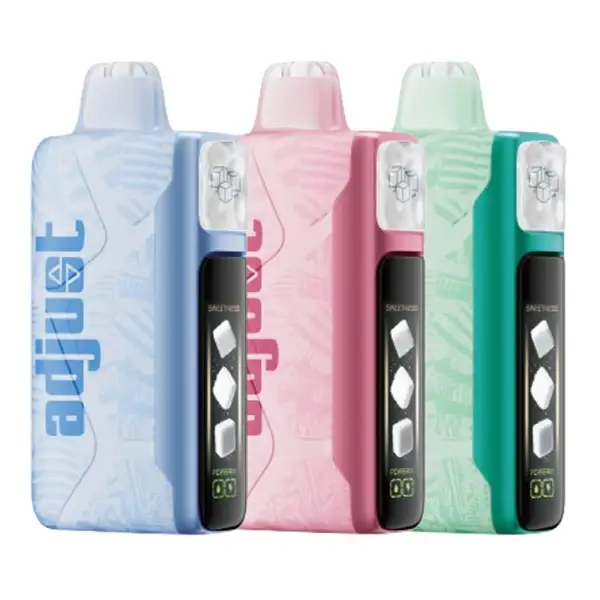
First-time Foger user? This guide walks you through everything: unboxing, pod installation, inhale activation, Normal vs Boost mode, airflow adjustment, OLED screen features, and practical tips for getting the best experience from both the Foger Switch Pro 30K and Bit 35K. Also covers: Fogger vape how to use, how does Foger work, and Foger vape instructions.
Foger Vape Instructions — Quick Start Overview
No matter which Foger device you have, the instructions boil down to three things: charge it, set it up, and inhale. Both the Switch Pro 30K and Bit 35K are draw-activated (no buttons) — but the Switch Pro has extra features worth understanding. Here's the shortest possible version:
| Step | Switch Pro 30K | Bit 35K |
|---|---|---|
| 1. Charge | USB-C into dock, 45-60 min | USB-C into device, 30-45 min |
| 2. Prep | Peel pod seal → snap pod onto dock → wait 10 sec | Remove packaging → ready |
| 3. Vape | Inhale from mouthpiece (auto-fires) | Inhale from mouthpiece (auto-fires) |
| 4. Customize | Adjust airflow ring + Normal/Boost toggle | N/A — fixed settings |
| 5. Swap/Replace | Pull old pod off → snap new pod on | Discard when empty → buy new unit |
That's the Foger vape instructions in 30 seconds. For the detailed walkthrough — with pro tips, OLED screen guide, and troubleshooting — keep reading below.
Foger Switch Pro 30K — First-Time Setup
The Switch Pro is a pod system: a reusable battery dock plus disposable flavor pods. If you bought the kit, your box contains the battery dock, one flavor pod, and a USB-C cable. Here's how to get vaping in under 60 seconds:
Foger Bit 35K — First-Time Setup
The Bit 35K is a standard disposable: everything is built into one device, no assembly required. Setup takes about 10 seconds.
The key difference from the Switch Pro: the Bit 35K is a single-use device. When the e-liquid runs out, you discard the entire unit. There are no swappable pods, no rechargeable dock to keep, and no flavor switching without buying a separate Bit 35K. For details on Foger's pod system advantages, see the pods and replacement guide.
Normal Mode vs Boost Mode (Switch Pro Only)
The Switch Pro offers two vaping modes that control coil power output. The Bit 35K operates at a single fixed power level and does not have selectable modes.
| Puff Count | Up to 30,000 |
| Vapor Density | Medium — smooth, consistent |
| Throat Hit | Moderate |
| Flavor Intensity | Balanced, accurate to flavor profile |
| Battery Drain | Standard — 1-2 days per charge |
| Best For | Daily use, flavor enjoyment, longer pod life |
| Puff Count | ~18,000 (40% less) |
| Vapor Density | High — thick, visible clouds |
| Throat Hit | Strong |
| Flavor Intensity | Punchy, amplified top notes |
| Battery Drain | 2-3x faster — daily charging likely |
| Best For | Cloud chasing, stronger nicotine delivery |
How to Switch Modes
The Switch Pro's mode selector is a physical toggle on the battery dock, not a software setting. Look for a small switch or dial on the side of the dock — slide it to change between Normal and Boost. The OLED screen confirms the active mode. You can switch mid-pod without any issues; the change is immediate.
Adjustable Airflow Explained
The Switch Pro has an adjustable airflow ring on the battery dock. Rotating this ring opens or restricts the air intake, which directly affects your vaping experience:
| Airflow Setting | Draw Feel | Vapor / Flavor | Best For |
|---|---|---|---|
| Fully Open | Loose, airy — minimal resistance | More vapor, slightly diluted flavor | Cloud production, smooth draws |
| Half Open | Medium resistance — balanced | Good vapor + strong flavor | Most users — best all-around setting |
| Nearly Closed | Tight — like drawing through a straw | Less vapor, concentrated flavor | Mouth-to-lung (MTL) style, ex-smokers |
If you're coming from cigarettes, start with the airflow nearly closed — it mimics the tight draw of a cigarette and delivers a stronger throat hit with concentrated flavor. If you prefer big, smooth clouds, open it up. There's no wrong setting; adjust it until the draw resistance feels comfortable to you.
The Bit 35K has a fixed airflow — no adjustment available. Its draw resistance is pre-set to a middle ground that works for most users.
Understanding the OLED Screen (Switch Pro Only)
The Switch Pro's built-in OLED screen provides real-time information about your device and pod status. Here's what each indicator means:
The screen activates automatically when you inhale and dims after a few seconds of inactivity. It's designed to be glanceable — you don't need to interact with it. Just note the battery % before heading out and the juice level when planning a pod swap.
How to Swap Pods (Switch Pro)
Swapping flavors is the core advantage of the Switch Pro system. The process takes under 5 seconds:
You can store partially used pods off the dock and return to them later. Keep them upright (mouthpiece up) at room temperature. No flavor ghosting occurs between pods because each pod has its own coil — the dock is just the power source. For the full pod deep-dive — all 28 flavors, pricing, compatibility — see our Foger pods guide.
8 Tips for the Best Experience
Common Beginner Mistakes
Replacement pods do NOT include a battery. If you've never owned a Switch Pro before, you need a Kit ($24.99) first, which includes the dock + one pod + USB-C cable. After that, you only need individual replacement pods ($16.99).
Mistake #2 — Skipping the prime. Attaching a new pod and immediately taking a hard drag. The wick needs 10-15 seconds to saturate. One dry hit won't destroy the pod, but it's unpleasant and avoidable.
Mistake #3 — Using Boost Mode full-time. Boost is fun, but it nearly halves your pod life (30K → ~18K puffs) and drains the battery 2-3x faster. Use it deliberately, not as a default.
Mistake #4 — Trying to refill pods. Foger pods are factory-sealed, closed systems. They cannot be refilled, opened, or injected with e-liquid. Attempting to do so causes leaking and potential device damage. For more detail, see our refill policy section.
Mistake #5 — Using a fast charger. Laptop chargers, MacBook bricks, and 25W+ phone adapters push too much power. Stick to a basic 5V/1A adapter — any standard phone charger from 2-3 years ago works perfectly. Full charging guidance: Foger charging guide.
Frequently Asked Questions
Does the Foger vape have buttons?
No. Both the Switch Pro 30K and Bit 35K are draw-activated (also called auto-draw). There are no fire buttons, no power buttons, and no click-to-start mechanisms. Simply inhale from the mouthpiece and the device activates automatically. The Switch Pro has a physical mode toggle and airflow ring, but neither is a button.
How do I know when the pod is empty?
On the Switch Pro, check the OLED screen — the juice level indicator shows remaining e-liquid. When it approaches zero, flavor will become noticeably muted or slightly burnt. On the Bit 35K, look through the tank window. If the liquid is no longer visible and flavor has dropped off, it's empty. Don't force draws on an empty pod.
Can I use the Switch Pro without the OLED screen?
The OLED screen doesn't control any functions — it's purely informational. If it malfunctions, the device still fires normally via draw activation. You'd lose visibility into battery %, juice level, and puff count, but the vaping experience itself is unaffected.
Is the Foger vape good for beginners?
Very much so. The Bit 35K is one of the simplest disposables available — unwrap and inhale. The Switch Pro has a slight learning curve (pod attachment, mode selection, airflow), but nothing that takes more than a minute to figure out. There are no coils to install, no wattage to configure, and no e-liquid to handle. If you're coming from cigarettes, the Switch Pro with tight airflow and Normal Mode closely mimics the draw resistance and throat hit of a traditional cigarette.
What's the difference between Foger Switch Pro and Foger Bit 35K?
The Switch Pro 30K is a two-part pod system (reusable battery + swappable pods). You buy the dock once and replace pods at $17 each. It has an OLED screen, adjustable airflow, and dual modes. The Bit 35K is a standard all-in-one disposable — no detachable parts, no screen, no adjustability. You use it until empty and discard. The Switch Pro is cheaper long-term if you vape regularly; the Bit 35K is simpler if you just want a grab-and-go device. Full comparison in our Foger brand guide.
How long does a Foger vape last?
The Switch Pro delivers up to 30,000 puffs per pod in Normal Mode (~18,000 in Boost). At 300-500 puffs/day, one pod lasts 2-4 weeks. The battery dock itself lasts hundreds of charge cycles — you'll go through many pods before the dock wears out. The Bit 35K delivers up to 35,000 puffs per device, lasting 3-5 weeks for moderate users.