Omar Hassan
Buying Guide Editor at VapesOnlineShop
Published February 2026 · Updated February 2026
📖 Beginner Guide · All 5 Devices
Adjust devices are draw-activated, pre-filled, and ready out of the box — but the adjustment systems aren't always obvious. This guide covers unboxing, first-use setup, how each adjustment system works, charging, and troubleshooting for all five Adjust devices.
Step 1: Unboxing and First Use
All five Adjust devices (MyRusher, MyCool, MySour, MySweet, MyFlavor) follow the same first-use process:
1
Remove from packaging. Take the device out of the box. A USB-C cable is not included — you'll need your own.
2
Remove any protective stickers or silicone plugs from the mouthpiece and charging port.
3
Inhale from the mouthpiece. Adjust devices are draw-activated — no buttons needed to start vaping. The display will light up on first draw.
4
Check battery level on the display. Devices come partially charged. If low, charge via USB-C before extended use.
Tip: Let the device sit upright for 2–3 minutes after unboxing before your first draw. This allows the e-liquid to fully saturate the coil and prevents a dry first puff.
Step 2: Using the Adjustment System
Each Adjust device has a unique adjustment feature. Here's how to operate each one:
⚡ MyRusher 40K — Power Modes
How to switch: Press the main button to cycle through Normal → Rush → Turbo. The display shows the active mode name and an animated indicator.
Aroma Boost: A dedicated button activates Rush mode instantly for a quick burst of enhanced flavor aroma.
What changes: Vapor temperature, density, and throat hit. Normal = smooth & efficient. Rush = warmer & more aromatic. Turbo = maximum output.
Puff impact: Normal ~40K · Rush ~30K · Turbo ~20K
Full MyRusher review →
Aroma Boost: A dedicated button activates Rush mode instantly for a quick burst of enhanced flavor aroma.
What changes: Vapor temperature, density, and throat hit. Normal = smooth & efficient. Rush = warmer & more aromatic. Turbo = maximum output.
Puff impact: Normal ~40K · Rush ~30K · Turbo ~20K
Full MyRusher review →
❄️ MyCool 40K — 5-Level Coolness
How to switch: Tap the button to cycle through 5 ice levels. The display shows the current level with a visual indicator.
Levels: Breeze (1) → Cool (2) → Chill (3) → Frost (4) → Arctic Freeze (5)
What changes: Menthol intensity on inhale and exhale. Low levels let fruit flavors dominate; high levels make cooling the primary sensation.
Also has: 3 Turbo modes (separate from ice levels) for vapor intensity control.
Full MyCool review →
Levels: Breeze (1) → Cool (2) → Chill (3) → Frost (4) → Arctic Freeze (5)
What changes: Menthol intensity on inhale and exhale. Low levels let fruit flavors dominate; high levels make cooling the primary sensation.
Also has: 3 Turbo modes (separate from ice levels) for vapor intensity control.
Full MyCool review →
🍋 MySour 40K — 4-Level Sourness
How to switch: Tap the button to cycle through Level 0 → 1 → 2 → 3. Display shows the active sour level.
What changes: Citric tang intensity. Level 0 = pure base flavor with no sour overlay. Level 3 = full pucker — a dramatic flavor transformation.
Also has: 3 Turbo modes + adjustable airflow.
MySour vs MyCool comparison →
What changes: Citric tang intensity. Level 0 = pure base flavor with no sour overlay. Level 3 = full pucker — a dramatic flavor transformation.
Also has: 3 Turbo modes + adjustable airflow.
MySour vs MyCool comparison →
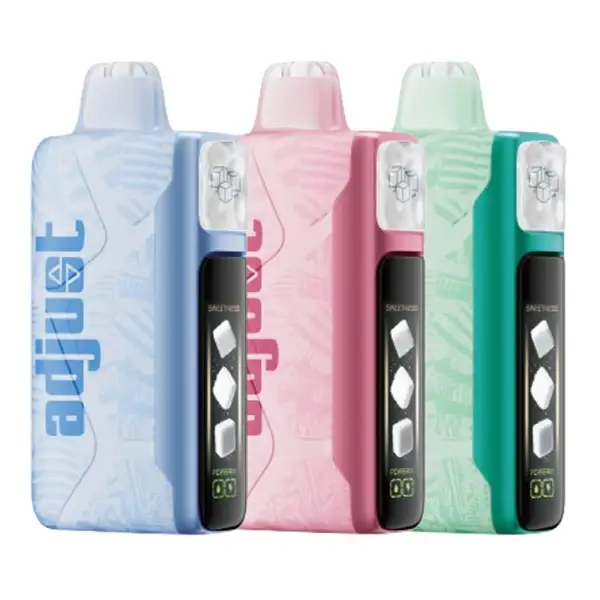
🍬 MySweet 40K — 4-Level Sweetness
How to switch: Tap the fire button to cycle through 4 sweetness levels. Display shows sugar cube icons (0–3 cubes).
Levels: Sweet Whisper (0) → Sweet Enjoyer (1) → Sweet Tooth (2) → Sweet Hunger (3)
What changes: Sweetness intensity in dessert-forward flavors. Feels natural, not like artificial sweetener was added.
Also has: 3 power modes + adjustable airflow.
Levels: Sweet Whisper (0) → Sweet Enjoyer (1) → Sweet Tooth (2) → Sweet Hunger (3)
What changes: Sweetness intensity in dessert-forward flavors. Feels natural, not like artificial sweetener was added.
Also has: 3 power modes + adjustable airflow.
🎨 MyFlavor 40K — Dual-Flavor Blend
How to switch: Use the buttons to cycle through 6 blend ratios. Each device contains two separate e-liquids (Flavor A and Flavor B).
Ratios: 100% A → 80/20 → 60/40 → 50/50 → 40/60 → 20/80 → 100% B
What changes: The balance between two distinct flavors. You can enjoy either flavor solo or create custom blends.
Also has: Adjustable airflow + display showing current blend ratio.
Ratios: 100% A → 80/20 → 60/40 → 50/50 → 40/60 → 20/80 → 100% B
What changes: The balance between two distinct flavors. You can enjoy either flavor solo or create custom blends.
Also has: Adjustable airflow + display showing current blend ratio.
Step 3: Adjusting Airflow
All five Adjust devices have adjustable airflow. Look for the sliding lever on the bottom of the device:
Slide Closed →
Tighter draw, stronger throat hit, more concentrated flavor. Similar to a cigarette pull.
← Slide Open
Looser draw, bigger clouds, airier feel. Better for lung hits and cloud production.
Step 4: Charging
| Device | Battery | Charge Time | Pass-Through |
|---|---|---|---|
| MyRusher 40K | 1,000 mAh | ~45–60 min | ✅ Yes |
| MyCool 40K | 850 mAh | ~90–100 min | ✅ Yes |
| MySour 40K | 850 mAh | ~90–100 min | ✅ Yes |
| MySweet 40K | 850 mAh | ~90–100 min | ✅ Yes |
| MyFlavor 40K | 850 mAh | ~90–100 min | ✅ Yes |
All devices use USB-C charging (cable not included). Pass-through charging is supported on all models — you can vape while plugged in. The display shows real-time battery status during charging.
Troubleshooting
Device isn't producing vapor
Check that all protective stickers/plugs are removed. Try a slow, steady draw rather than a sharp inhale — the draw sensor needs consistent airflow to activate. If the display lights up but no vapor comes out, the coil may need a few seconds to warm up. Charge the battery if the display shows low power.
Burnt or dry taste
This usually happens with a new device that hasn't been primed. Let it sit upright for 3–5 minutes before first use. If it persists, the e-liquid level may be low — check the display (or transparent tank on MyRusher). On higher turbo modes, the coil runs hotter and can produce a dryer hit; switch to a lower power mode.
Display is on but buttons aren't responding
Try pressing the button firmly for 2–3 seconds rather than a quick tap. Some devices have a lock mode that activates after inactivity — press the button 3–5 times rapidly to unlock. If the device is charging, some button functions may be temporarily limited.
Adjustment level doesn't seem to change
Make sure you're pressing the correct button — some devices have separate buttons for adjustment and power modes. After changing a level, take 2–3 puffs for the new setting to fully come through. On MyCool, the difference between adjacent ice levels is subtle at lower settings (Breeze vs Cool) but dramatic at higher settings (Frost vs Arctic Freeze).
Device isn't charging
Verify the USB-C cable is fully inserted — the port on Adjust devices is snug. Try a different cable and power source. The device should display a charging indicator when connected. If the display doesn't respond to charging, the battery may be fully depleted — leave it plugged in for 10–15 minutes before checking again.
FAQ
Do I need to press a button to vape, or is it draw-activated?
All Adjust devices are draw-activated — just inhale from the mouthpiece to start vaping. The buttons are used for changing adjustment levels (ice, sourness, sweetness, power modes, blend ratios), not for activating the device. The exception is MyRusher's Aroma Boost button, which instantly activates Rush mode.
Can I refill an Adjust Vape with my own e-liquid?
No. All Adjust devices are pre-filled and sealed. They are not designed to be opened or refilled. When the e-liquid runs out, the device should be disposed of responsibly. Each device contains 20 mL of pre-filled 5% salt nicotine e-liquid.
How long does an Adjust Vape last?
All Adjust devices are rated at up to 40,000 puffs on their lowest power mode. In practice, moderate daily use yields 2–4 weeks per device depending on your power setting and puff frequency. Higher turbo/power modes reduce the total puff count (Turbo III or Turbo mode on any device gives ~20,000 puffs).
Which Adjust device is best for beginners?
MyCool 40K is the most beginner-friendly — the cooling adjustment is intuitive (more ice = colder, simple), and the 15-flavor selection gives you the best chance of finding a flavor you like. Start at Breeze (Level 1) ice with Turbo I mode for the gentlest experience. See the full Adjust Vape guide for a comparison of all five devices.
— Reviewed by VapesOnlineShop editorial team.